How to Use the Dashboard?
Your admin dashboard displays quick facts about your system. Each figure is clickable and leads to a page with detailed information and options.
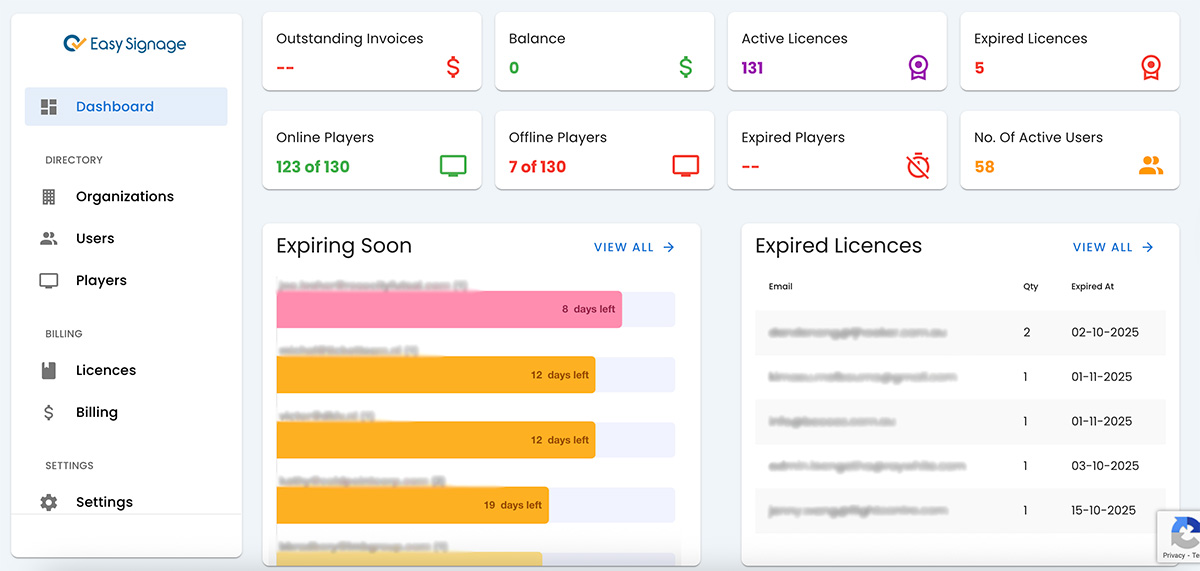
Outstanding Invoices: Amount of outstanding invoices and a shortcut to the billing page.
Balance: It is the default admin payment amount with a shortcut to the billing page.
Active Licences: Display the total number of active licences with a shortcut to open the licences page filtered to show active licences only.
Expired Licences: Show the total number of expired licences with a shortcut to open the licences page filtered to show expired licences only.
Online Player: Show the total number of online players for all your clients and a shortcut to the players’ page filtered to show online players only.
Offline Players: Show the total number of offline players for all your clients and a shortcut to the players’ page filtered to show offline players only.
Expired Players: Show the total number of expired players for all your clients and a shortcut to the players’ page filtered to show expired players only.
No. of Active Users: Show the total number of active users and a shortcut to the users page filered to show users with licences only.
Expiring Soon: Show the top licenses expiring within 60 days and provide a shortcut to the expiring licenses page.